# Passolution Dataservice API
The Passolution Dataservice API is a RESTful interface to retrieve entry requirements, visa regulations, health information and more for destinations around the world.
# Introduction
### Target Group
Our API is suitable for suppliers of front and back office systems, as well as tour operators and OTAs who wish to deliver data from Passolution within the framework of the EU Package Travel Directive via their systems to travel agencies or end customers.
### Available Languages
The required data can be supplied in different languages. Currently the following languages are supported:
* German
* English
* Dutch
* Bulgarian
* Czech
* Danish
* Finnish
* French
* Greek
* Hungarian
* Italian
* Norwegian
* Polish
* Portuguese
* Romanian
* Russian
* Slovak
* Slovenian
* Spanish
* Swedish
* Turkish
### API Requests
Our API is stateless and accepts HTTP GET & POST requests. The request body can be sent in JSON data format.
### API Response
The API response is in JSON data format.
#### HTTP Status Codes
| Code | Meaning | Description |
| ------- | ------- | --------|
| 200 | OK | The API request is successful. |
| 204 | NO CONTENT | There is no content available for the request. |
| 401 | AUTHORIZATION ERROR | Invalid or expired credentials used. |
| 403 | FORBIDDEN | No permission to do the operation. |
| 404 | METHOD NOT ALLOWED | The specified method is not allowed. |
| 429 | TOO MANY REQUESTS | Number of API requests for the 24 hour period is exceeded or the concurrency limit of the user for the app is exceeded. |
| 500 | INTERNAL SERVER ERROR | Generic error that is encountered due to an unexpected server error. |
# Authentication
Our API (api.passolution.eu) requires bearer token (access token) to be sent as HTTP Authorization header, ie:
```text
Authorization: Bearer
```
To facilitate bearer / access token generation, our authorization server web.passolution.eu implements OAuth 2 specification. It authenticates Passolution users and then allows users to authorize third party applications (eg: your app) to access Passolution API on their behalf for providing services to them that rely on Passolution data.
**If you wish to provide services to our users, kindly contact us to get your OAuth details** (Client ID & Secret) which you will need for requesting access to API on a user's behalf.
# OAuth Authentication
The Passolution Dataservice API uses OAuth 2.0 protocol, an industry-standard protocol for authentication & authorization of third-party applications (eg: your app) to gain delegated access to API (Passolution) resources on a user's (Passoution) behalf.
#### OAuth Benefits
- Third-party applications are not required to handle or store user credentials, which can be a security risk.
- Third-party applications gain delegated access, i.e., access only to resources authorized by user.
- Users can revoke an application's access anytime.
- OAuth 2.0 access tokens expire after a set period of time which reduces risk, eg: when old access tokens are leaked in a security breach. If an application faces a security breach, all its access tokens can be disabled at once (preventing unauthorized access) without affecting user's or other application's access.
#### How OAuth 2.0 works?
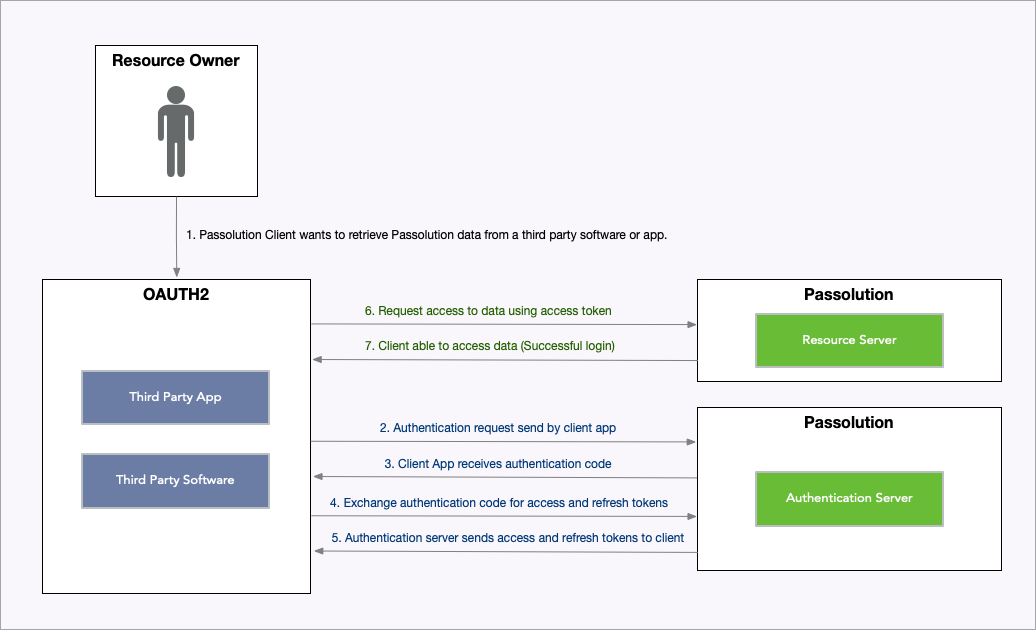
Open Full Image
#### OAuth Terminology
You should familiarize yourself with following terms to help understand the OAuth authorization flow before you start using Passolution Dataservice API:
##### Protected Resources
The Passolution Dataservice resources, such as Entry, Visa, Transit Visa & Health Requirements etc.
##### Resource Server
The Passolution API Service (api.passolution.eu) that hosts protected resources.
##### OAuth Client
An application (eg: your app) implementing OAuth protocol that sends requests to the Resource Server (Passolution API) to access protected resources on behalf of a Passolution user.
##### Authorization Server
Passolution Service (web.passolution.eu) that authenticates users and allows users to authorize an OAuth Client (your app) to access Resource Server (Passolution API) on their behalf. After authorization, the OAuth Client (your app) can contact this server to get user's Access Token.
##### Access Token
Access Token allows access to Resource Server (Passolution API) on a user's behalf.
It is a long string of seemingly random characters that actually is encoded data which allows Resource Server (Passolution API) to know which OAuth Client is accessing the API service on which user's behalf.
##### Refresh Token
A token that can be used to obtain a new Access Token by contacting the Authorization Server (web.passolution.eu). A new token should be generated using the refresh token before the refresh token expires.
##### Client ID
A unique ID assigned to an OAuth Client application used in OAuth protocol.
##### Client Secret
A shared secret value that allows Authorization Server (web.passolution.eu) to authenticate an OAuth Client application during OAuth protocol data exchange.
##### Authorization Code
Once a Passolution user authorizes your OAuth Client application, our Authorization Server (web.passolution.eu) will generate and send an Authorization Code to your application. Your application can then contact the Authorization Server to exchange this Authorization Code with Access Token & Refresh Token for the Passolution user.
##### Grant Types
Grant Types are different ways an OAuth Client (eg: your application) can request access token. There are several OAuth Grant Types which are described below.
# OAuth Grant Types
OAuth Grant Types are different ways you can get access token for your own Passolution account or on behalf of a Passolution user. They have different limitations and use cases which are explained below.
#### Authorization Code
This is the most widely used grant type for **applications that require delegated access** (access on a user's behalf) and **have its own servers** that can directly interact with our Authorization Server (web.passolution.eu) to get access tokens.
#### Authorization Code Grant With PKCE
This grant type is used when you **don't have your own servers** that can securely store your OAuth Client Secret & user's access tokens but still **need delegated access** on Passolution user's behalf.
For example, if you have a Single Page App without backend servers, you can get access token with this grant type and store the access token for user in their browser itself (Web Storage API).
#### Client Credentials
This grant type can be used to **get access token for your own Passolution account only**. Kindly note that this grant type does not provide access on other Passolution user's behalf.
# Requesting Access Token
**Note**: If you are unsure which Grant Type / method of requesting Access Token you need to use, kindly go over the 'OAuth Grant Types' section first.
**If you don't have your OAuth details, kindly contact us with the following details about your application**:
| Detail | Explanation |
| ------- | ------- |
| **Website**: | Website for general information about your product / service,
**eg**: https://example.com |
| **Redirect URL**: | Endpoint where your application / service will handle OAuth responses sent by Passolution Authorization Server
**eg**: https://example.com/handle-oauth-authorization |
| **Grant Type**: | The Grant Type your application needs to use, check 'OAuth Grant Types' section for details.
**eg**: Authorization Code |
We will provide you the following OAuth details after setting up OAuth Client for your application:
| Detail | Explanation |
| ------- | ------- |
| **Client ID**: | A unique ID assigned to your OAuth Client application to be used in OAuth protocol. |
| **Client Secret**: | A shared secret value that allows Authorization Server (web.passolution.eu) to authenticate your OAuth Client application during OAuth protocol data exchange.
**It should not be stored outside of your secure servers** |
We will now go over the OAuth Grant Types (method of requesting Access Token) and discuss how they can be implemented in your application.
Here are some endpoints on our OAuth Authorization Server that your application will need to interact with:
| OAuth Endpoint | URL |
| ------- | ------- |
| **Authorization URL**: | https://web.passolution.eu/oauth/authorize |
| **Token URL**: | https://web.passolution.eu/oauth/token |
| **Token Refresh URL**: | https://web.passolution.eu/oauth/token |
## Authorization Code
For this grant type (read '_OAuth Grant Types_' section), your application will have to redirect users to Passolution's Authorization Server's Authorization URL with following parameters:
| Parameter | Description |
| ------- | ------- |
| client_id | Your OAuth Client ID |
| redirect_uri | Redirect URL that you provided us when requesting OAuth details for your application. |
| response_type | 'response_type' parameter should be set to 'code' for Authorization Code Grant Type. |
| scope | 'scope' parameter should be set to '*' to request access to all API resources. |
| state | 'state' parameter should contain a random string that you store to user's session storage and verify later when handling authorization response received on your Redirect URL endpoint sent as redirect_uri parameter. |
**state** parameter code logic example:
```javascript
const userState = RandomString::generate(); // eg: G8TZWEjUmuWFZgtHZ5gs
UserSession::set('user-oauth-state', userState);
Redirect::toUrl('https://web.passolution.eu/oauth/authorize?...&state=' + userState);
```
Example:
```text
https://web.passolution.eu/oauth/authorize?client_id=your-client-id&redirect_uri=https://your-website.example.com/handle-oauth-authorization&response_type=code&scope=%2A&state=random-state-for-user
```
At this stage, on our Authorization Server, the user will be asked to login (if not already logged in) and then they will be able to decide if they want to allow access to your application. Once they allow access, they will be redirected to your Redirect URL with following parameters:
| Parameter | Description |
| ------- | ------- |
| state | This is the random string that you sent when redirecting user to Authorization Server. You should have stored it in user's session storage and should now **confirm that the values received matches the stored value**. |
| code | This is authorization code that you can use to get access token as explained in next step. |
Example:
```text
https://your-website.example.com/handle-oauth-authorization?state=random-state-that-was-sent-for-user&code=authorization_code
```
**state** parameter verification logic example:
```javascript
// stored earlier when redirecting user for login
const userState = UserSession::get('user-oauth-state');
if(userState == Url::getParameter('state')) {
// exchange authorization code for Access Token as described below.
}
else {
throw Exception('OAuth Login: Invalid state parameter received.');
}
```
To exchange the authorization code (code parameter received on Redirect URL) for Access Token & Refresh Token for the user, you have to make a POST request to Authorization Server's Token URL (https://web.passolution.eu/oauth/token), eg:
```http request
POST https://web.passolution.eu/oauth/token
Content-Type: application/json
{
"client_id": "your-client-id",
"client_secret": "your-client-secret",
"grant_type": "authorization_code",
"redirect_uri": "https://your-website.example.com/handle-oauth-authorization",
"code": "authorization-code"
}
```
Data fields used in the request body above are described below:
| Parameter | Description |
| ------- | ------- |
| client_id | Your OAuth Client ID |
| client_secret | Your OAuth Client Secret
**It should not be stored outside of your secure servers** |
| grant_type | 'grant_type' field should be set to 'authorization_code' for the Authorization Code Grant Type |
| redirect_uri | Redirect URL of the endpoint where the authorization response was received. |
| code | The authorization code received as 'code' parameter to your Redirect URL endpoint |
The Token URL endpoint will respond with JSON response containing following fields:
```json
{
"expires_in": 31536000,
"access_token": "eyJ...",
"refresh_token": "def..."
}
```
| Parameter | Description |
| ------- | ------- |
| expires_in | Number of seconds after which the access token will expire. |
| access_token | Access Token for the User |
| refresh_token | Refresh Token for the User which can be used to generate new Access Token before expiry |
## Authorization Code Grant With PKCE
For this grant type (read '_OAuth Grant Types_' section), your application will have to redirect users to Passolution's Authorization Server's Authorization URL with following parameters:
| Parameter | Description |
| ------- | ------- |
| client_id | Your OAuth Client ID |
| redirect_uri | Redirect URL that you provided us when requesting OAuth details for your application. |
| response_type | 'response_type' parameter should be set to 'code' for Authorization Code Grant Type. |
| scope | 'scope' parameter should be set to '*' to request access to all API resources. |
| state | 'state' parameter should contain a random string that you store to user's session storage and verify later when handling authorization response received on your Redirect URL endpoint sent as redirect_uri parameter. |
| code_challenge | 'code_challenge' parameter value should be Base64 encoded value (URL safe characters) of SHA256 hash of a randomly generated 'Code Verifier'. The Code Verifier should be randomly generated string of length between 43 and 128 characters. Trailing '=' characters as well as any whitespace or line breaks should be removed from the Base64 encoded value.
**See code logic below** |
| code_challenge_method | 'code_challenge_method' parameter should be set to 'S256' specifying the SHA256 hash algorithm being used. |
**state & code_challenge** parameter code logic example:
```javascript
const userState = RandomString::generate(); // eg: G8TZWEjUmuWFZgtHZ5gs
UserSession::set('user-oauth-state', userState);
const codeVerifierLength = 128;
const codeVerifier = RandomString::generate(codeVerifierLength); // eg: L5nD...UKbN
UserSession::set('user-oauth-code-verifier', codeVerifier);
const hashBinary = SHA256::hashAsBinary(codeVerifier); // SHA256 hash as binary data
let codeChallenge = Base64::encode(hashBinary); // Base64 encode SHA256 hash
// Removing trailing '=' characters and replace URL unsafe characters ('+' & '/')
codeChallenge = String::removeFromEnd(codeChallenge, '=');
codeChallenge = String::replace(codeChallenge, '+', '-');
codeChallenge = String::replace(codeChallenge, '/', '_');
Redirect::toUrl('https://web.passolution.eu/oauth/authorize?...&state=' + userState + '&code_challenge=' + codeChallenge);
```
Example:
```text
https://web.passolution.eu/oauth/authorize?client_id=your-client-id&redirect_uri=https://your-website.example.com/handle-oauth-authorization&response_type=code&scope=%2A&state=random-state-for-user&code_challenge=code-challange&code_challenge_method=S256
```
At this stage, on our Authorization Server, the user will be asked to login (if not already logged in) and then they will be able to decide if they want to allow access to your application. Once they allow access, they will be redirected to your Redirect URL with following parameters:
| Parameter | Description |
| ------- | ------- |
| state | This is the random string that you sent when redirecting user to Authorization Server. You should have stored it in user's session storage and should now **confirm that the values received matches the stored value**. |
| code | This is authorization code that you can use to get access token as explained in next step. |
Example:
```text
https://your-website.example.com/handle-oauth-authorization?state=random-state-that-was-sent-for-user&code=authorization_code
```
**state** parameter verification logic example:
```javascript
// stored earlier when redirecting user for login
const userState = UserSession::get('user-oauth-state');
if(userState == Url::getParameter('state')) {
// exchange authorization code for Access Token as described below.
}
else {
throw Exception('OAuth Login: Invalid state parameter received.');
}
```
To exchange the authorization code (code parameter received on Redirect URL) for Access Token & Refresh Token for the user, you have to make a POST request to Authorization Server's Token URL (https://web.passolution.eu/oauth/token), eg:
```http request
POST https://web.passolution.eu/oauth/token
Content-Type: application/json
{
"client_id": "your-client-id",
"grant_type": "authorization_code",
"redirect_uri": "https://your-website.example.com/handle-oauth-authorization",
"code": "authorization-code",
"code_verifier": "code-verifier"
}
```
Data fields used in the request body above are described below:
| Parameter | Description |
| ------- | ------- |
| client_id | Your OAuth Client ID |
| grant_type | 'grant_type' field should be set to 'authorization_code' for the Authorization Code Grant Type |
| redirect_uri | Redirect URL of the endpoint where the authorization response was received. |
| code | The authorization code received as 'code' parameter to your Redirect URL endpoint |
| code_verifier | The Code Verifier (non hashed value) that we randomly generated earlier for user and stored in session storage. |
The Token URL endpoint will respond with JSON response containing following fields:
```json
{
"expires_in": 31536000,
"access_token": "eyJ...",
"refresh_token": "def..."
}
```
| Parameter | Description |
| ------- | ------- |
| expires_in | Number of seconds after which the access token will expire. |
| access_token | Access Token for the User |
| refresh_token | Refresh Token for the User which can be used to generate new Access Token before expiry |
## Client Credentials
Since this grant type (read '_OAuth Grant Types_' section) only allows access to your own account, you only need your OAuth Client ID & Client Secret to generate an Access Token using the Token URL endpoint (https://web.passolution.eu/oauth/token):
```http request
POST https://web.passolution.eu/oauth/token
Content-Type: application/json
{
"client_id": "your-client-id",
"client_secret": "your-client-secret",
"grant_type": "client_credentials"
}
```
| Parameter | Description |
| ------- | ------- |
| client_id | Your OAuth Client ID |
| client_secret | Your OAuth Client Secret
**It should not be stored outside of your secure servers** |
| grant_type | 'grant_type' field should be set to 'client_credentials' when using Client Credentials Grant Type |
The Token URL endpoint will respond with JSON response containing following fields:
```json
{
"expires_in": 31536000,
"access_token": "eyJ..."
}
```
| Parameter | Description |
| ------- | ------- |
| expires_in | Number of seconds after which the access token will expire. |
| access_token | Access Token for the OAuth Client Passolution Account |
# Using Access Token
The Access Token received from Token URL can be used to access API by sending it in Authorization header as a Bearer token, eg:
```http request
GET https://api.passolution.eu/api/v2/infosystem/passolution
Authorization: Bearer eyJ...
```
# Refreshing Access Token
The Refresh Token received with Access Token can be used to get a **new Access Token & Refresh Token** before the expiry by making a POST request to Authorization Server's Token Refresh URL (https://web.passolution.eu/oauth/token):
> **Note**: A Refresh Token can be used only once. Make sure to store new Refresh Token received when refreshing an Access Token for future use.
```http request
POST https://web.passolution.eu/oauth/token
Content-Type: application/json
{
"client_id": "your-client-id",
"client_secret": "your-client-secret",
"grant_type": "refresh_token",
"refresh_token": "refresh-token-value"
}
```
> **Note**: The Token Refresh URL is rate limited to 300 requests per minute.
| Parameter | Description |
| ------- | ------- |
| client_id | Your OAuth Client ID |
| client_secret | Your OAuth Client Secret
**It should not be stored outside of your secure servers** |
| grant_type | 'grant_type' field should be set to 'refresh_token' when using refresh token for generating new Access Token |
| refresh_token | The refresh token that was received when exchanging 'authorization code' for Access Token |
The Refresh Token URL endpoint will respond with JSON response containing following fields:
```json
{
"expires_in": 31536000,
"access_token": "eyJ...",
"refresh_token": "def..."
}
```
| Parameter | Description |
| ------- | ------- |
| expires_in | Number of seconds after which the new access token will expire. |
| access_token | New Access Token for the User |
| refresh_token | **New Refresh Token** for the User which can be used to generate new Access Token again |
> **Note**: A Refresh Token can be used only once. Make sure to store the new Refresh Token received in response for future use.
# Important Note
**OAuth Client Secret, Access Tokens / Bearer Tokens must be kept confidential**. \
\
**DO NOT** expose these details anywhere in public forums, public repositories or on your website's client-side code like HTML or JavaScript. Exposing it to the public may lead to data theft or loss.
Version: 2.0.0
## Servers
```
https://api.passolution.eu/api/v2
```
## Security
### oAuth
Type: oauth2
### bearerAuth
Authentication via Bearer Token. Use your API token in the Authorization header.
Type: http
Scheme: bearer
Bearer Format: JWT
## Download OpenAPI description
[Passolution Dataservice API](https://api-doc.passolution.eu/_bundle/openapi.yaml)
## API Server
### Health Information
- [GET /health](https://api-doc.passolution.eu/openapi/api-server/checkhealth.md): You may ping this endpoint to confirm that Passolution API is working & accessible.
### Version Information
- [GET /version](https://api-doc.passolution.eu/openapi/api-server/checkversion.md): Get the API version number
## Account Information
### Subscription
- [GET /account/subscription](https://api-doc.passolution.eu/openapi/account-information/getaccountsubscription.md): Get information about user's subscription of Passolution service including available features.
### Login Link Generation
- [GET /auth/login/generate_link](https://api-doc.passolution.eu/openapi/account-information/generateloginlink.md): Allows generation of a link which logs a user into Passolution website directly and redirects to provided page.
The generated link is only valid for 30 seconds as it is supposed to be consumed directly.
Using account access token, you can generate login link of any user of the account:
text
.../auth/login/generate_link?page=/&username=user@example.com
If you have user access token, you can generate login link for user directly:
.../auth/login/generate_link?page=/
## Basic Data - General
### Countries
- [GET /countries](https://api-doc.passolution.eu/openapi/basic-data-general/getcountries.md): Get list of countries with basic information.
### Get Location Information
- [GET /countries/de/locations](https://api-doc.passolution.eu/openapi/basic-data-general/getcountrylocations.md): Get list of locations optionally filtered by zip code. \
Note: Only German locations are currently supported.
### Nationalities
- [GET /nationalities](https://api-doc.passolution.eu/openapi/basic-data-general/getnationalities.md): Get list of nationalities with basic information.
### Languages
- [GET /languages](https://api-doc.passolution.eu/openapi/basic-data-general/getlanguages.md): Get list of available languages.
## Basic Data - Entry Requirements
### Entry - Documents
- [GET /entry/documents](https://api-doc.passolution.eu/openapi/basic-data-entry-requirements/getentrydocumentrecords.md): Entry Document records are dynamic records that we provide information about in our Entry Requirements for different destinations. \
\
You may use this endpoint to know possible documents that are currently supported. \
It may also be useful in searching for destinations based on these documents (eg: using .../api/v2/destinations endpoint).
### Entry - Additional Info
- [GET /entry/additional-info](https://api-doc.passolution.eu/openapi/basic-data-entry-requirements/getentryadditionalinformationrecords.md): Entry Additional Info records are dynamic topics that we provide information about in our Entry Requirements for different destinations. \
\
You may use this endpoint to know possible topics that are currently available. \
It may also be useful in searching for destinations based on these topics (eg: using .../api/v2/destinations endpoint).
### Health - Immunizations
- [GET /health/immunizations](https://api-doc.passolution.eu/openapi/basic-data-entry-requirements/gethealthimmunizationrecords.md): Immunization records are dynamic records that we provide information about in our Entry Requirements for different destinations. \
\
You may use this endpoint to know possible immunizations that are currently available. \
It may also be useful in searching for destinations based on these immunizations (eg: using .../api/v2/destinations endpoint).
## Infosystem
### Country News
- [GET /infosystem/general](https://api-doc.passolution.eu/openapi/infosystem/getinfosystemgeneral.md): Get General Updates
### Passolution News
- [GET /infosystem/passolution](https://api-doc.passolution.eu/openapi/infosystem/getpassolutionnews.md): Get Passolution News
## Entry Requirements
### Search Destinations
- [POST /destinations](https://api-doc.passolution.eu/openapi/entry-requirements/searchdestinations.md): Get list of destinations / countries that meet traveller's preferences & eligibility. \
See examples below
### All Requirements - HTML
- [POST /content/all/{type}](https://api-doc.passolution.eu/openapi/entry-requirements/getallinformationhtml.md): Note: Shareable link feature may not be enabled for your account.
\
Note: If shareable link is not required, a GET request can be made.
### All Requirements - Text
- [POST /content/all/text](https://api-doc.passolution.eu/openapi/entry-requirements/getallinformationtext.md): Note: Shareable link feature may not be enabled for your account.
\
Note: If shareable link is not required, a GET request can be made.
### All Requirements - PDF
- [POST /content/all/pdf](https://api-doc.passolution.eu/openapi/entry-requirements/getallinformationpdf.md)
### Overview - JSON
- [POST /content/overview/json](https://api-doc.passolution.eu/openapi/entry-requirements/getoverviewinformationjson.md)
### Overview - HTML
- [POST /content/overview/html](https://api-doc.passolution.eu/openapi/entry-requirements/getoverviewinformationhtml.md)
### Overview - PDF
- [POST /content/overview/pdf](https://api-doc.passolution.eu/openapi/entry-requirements/getoverviewinformationpdf.md)
### Entry - JSON
- [POST /content/entry/json](https://api-doc.passolution.eu/openapi/entry-requirements/getentryinformationjson.md)
### Entry - HTML
- [POST /content/entry/html](https://api-doc.passolution.eu/openapi/entry-requirements/getentryinformationhtml.md)
### Entry - Text
- [POST /content/entry/text](https://api-doc.passolution.eu/openapi/entry-requirements/getentryinformationtext.md)
### Entry - PDF
- [POST /content/entry/pdf](https://api-doc.passolution.eu/openapi/entry-requirements/getentryinformationpdf.md)
### Visa - JSON
- [POST /content/visa/json](https://api-doc.passolution.eu/openapi/entry-requirements/getvisainformationjson.md)
### Visa - HTML
- [POST /content/visa/html](https://api-doc.passolution.eu/openapi/entry-requirements/getvisainformationhtml.md)
### Visa - Text
- [POST /content/visa/text](https://api-doc.passolution.eu/openapi/entry-requirements/getvisainformationtext.md)
### Visa - PDF
- [POST /content/visa/pdf](https://api-doc.passolution.eu/openapi/entry-requirements/getvisainformationpdf.md)
### Transit Visa - HTML
- [POST /content/transit_visa/html](https://api-doc.passolution.eu/openapi/entry-requirements/gettransitvisainformationhtml.md)
### Transit Visa - Text
- [POST /content/transit_visa/text](https://api-doc.passolution.eu/openapi/entry-requirements/gettransitvisainformationtext.md)
### Transit Visa - PDF
- [POST /content/transit_visa/pdf](https://api-doc.passolution.eu/openapi/entry-requirements/gettransitvisainformationpdf.md)
### Health - JSON
- [POST /content/health/json](https://api-doc.passolution.eu/openapi/entry-requirements/gethealthinformationjson.md)
### Health - HTML
- [POST /content/health/html](https://api-doc.passolution.eu/openapi/entry-requirements/gethealthinformationhtml.md)
### Health - Text
- [POST /content/health/text](https://api-doc.passolution.eu/openapi/entry-requirements/gethealthinformationtext.md)
### Health - PDF
- [POST /content/health/pdf](https://api-doc.passolution.eu/openapi/entry-requirements/gethealthinformationpdf.md)
## Country Information
### HTML
- [POST /content/country/html](https://api-doc.passolution.eu/openapi/country-information/getcountryinformationhtml.md)
### PDF
- [POST /content/country/pdf](https://api-doc.passolution.eu/openapi/country-information/getcountryinformationpdf.md)
## Travel Information
### Get Destination Info
- [POST /information/search](https://api-doc.passolution.eu/openapi/travel-information/searchinformation.md): Get travel information for destinations based on travellers' nationalities. \
Optionally, get shareable link for the information. \
\
Note: Shareable link feature may not be enabled for your account. \
Note: If shareable link is not required, a GET request can be made.
### Share Travel Info
- [POST /information/share](https://api-doc.passolution.eu/openapi/travel-information/paths/~1information~1share/post.md): Get link to share travel information easily.
### Get Media Records
- [POST /travel-details/media](https://api-doc.passolution.eu/openapi/travel-information/gettraveldetailmedialist.md)
## Travel Details Links
### Get Links
- [POST /travel-details](https://api-doc.passolution.eu/openapi/travel-details-links/gettraveldetails.md)
### Get Info
- [GET /travel-details/{id}](https://api-doc.passolution.eu/openapi/travel-details-links/gettraveldetaillink.md)
### Update Info
- [POST /travel-details/{id}](https://api-doc.passolution.eu/openapi/travel-details-links/updatetraveldetaillink.md)
### Delete Link
- [DELETE /travel-details/{id}](https://api-doc.passolution.eu/openapi/travel-details-links/deletetraveldetaillink.md)
## Individual Content
### Individual Content
- [GET /individual-content](https://api-doc.passolution.eu/openapi/individual-content/getindividualcontent.md)
### Update Individual Content
- [POST /individual-content](https://api-doc.passolution.eu/openapi/individual-content/updateindividualcontent.md)
### Delete Individual Content Sections
- [DELETE /individual-content](https://api-doc.passolution.eu/openapi/individual-content/deleteindividualcontentsections.md)
### Update Individual Content Section Order
- [POST /individual-content/order](https://api-doc.passolution.eu/openapi/individual-content/updateindividualcontentsectionorder.md)
## Tour Operator Content
### Tour Operator Content
- [GET /tour-operator/{code}](https://api-doc.passolution.eu/openapi/tour-operator-content/gettouroperatorcontent.md)
### Update Tour Operator Content
- [POST /tour-operator/{code}](https://api-doc.passolution.eu/openapi/tour-operator-content/updatetouroperatorcontent.md)
### Delete Tour Operator Content Sections
- [DELETE /tour-operator/{code}](https://api-doc.passolution.eu/openapi/tour-operator-content/deletetouroperatorcontentsections.md)