Language code for response content.
- Entry - HTML
Search Destinations
All Requirements - HTML
All Requirements - Text
All Requirements - PDF
Overview - JSON
Overview - HTML
Overview - PDF
Entry - JSON
Entry - Text
Entry - PDF
Visa - JSON
Visa - HTML
Visa - Text
Visa - PDF
Transit Visa - HTML
Transit Visa - Text
Transit Visa - PDF
Health - JSON
Health - HTML
Health - Text
Health - PDF
Entry - HTML
Passolution Dataservice API (2.0.0)
The Passolution Dataservice API is a RESTful interface to retrieve entry requirements, visa regulations, health information and more for destinations around the world.
Our API is suitable for suppliers of front and back office systems, as well as tour operators and OTAs who wish to deliver data from Passolution within the framework of the EU Package Travel Directive via their systems to travel agencies or end customers.
The required data can be supplied in different languages. Currently the following languages are supported:
- German
- English
- Dutch
- Bulgarian
- Czech
- Danish
- Finnish
- French
- Greek
- Hungarian
- Italian
- Norwegian
- Polish
- Portuguese
- Romanian
- Russian
- Slovak
- Slovenian
- Spanish
- Swedish
- Turkish
Our API is stateless and accepts HTTP GET & POST requests. The request body can be sent in JSON data format.
| Code | Meaning | Description |
|---|---|---|
| 200 | OK | The API request is successful. |
| 204 | NO CONTENT | There is no content available for the request. |
| 401 | AUTHORIZATION ERROR | Invalid or expired credentials used. |
| 403 | FORBIDDEN | No permission to do the operation. |
| 404 | METHOD NOT ALLOWED | The specified method is not allowed. |
| 429 | TOO MANY REQUESTS | Number of API requests for the 24 hour period is exceeded or the concurrency limit of the user for the app is exceeded. |
| 500 | INTERNAL SERVER ERROR | Generic error that is encountered due to an unexpected server error. |
Our API (api.passolution.eu) requires bearer token (access token) to be sent as HTTP Authorization header, ie:
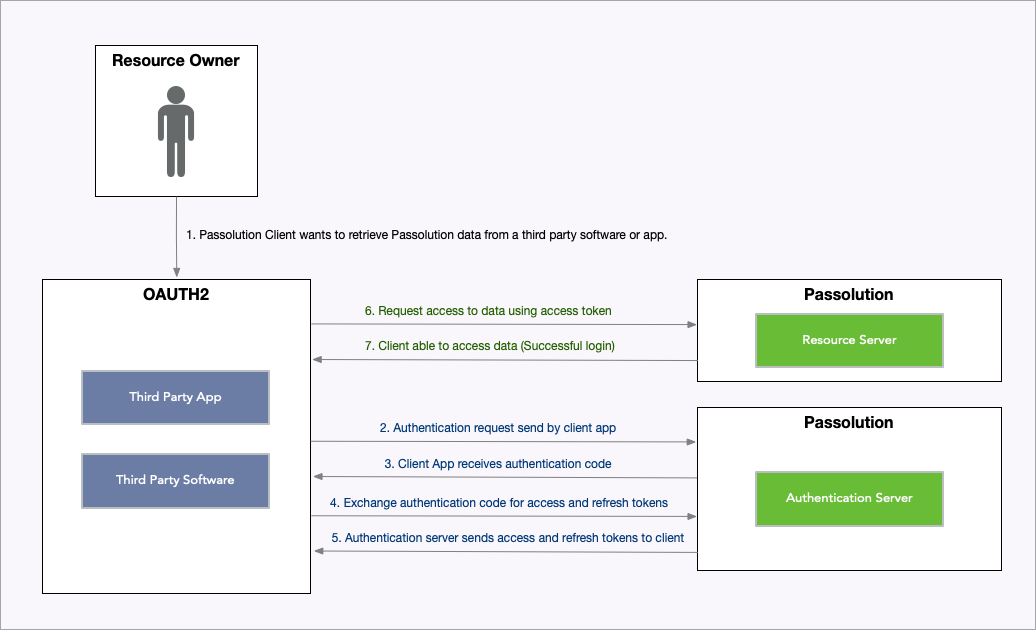
Authorization: Bearer <access-token>To facilitate bearer / access token generation, our authorization server web.passolution.eu implements OAuth 2 specification. It authenticates Passolution users and then allows users to authorize third party applications (eg: your app) to access Passolution API on their behalf for providing services to them that rely on Passolution data.
If you wish to provide services to our users, kindly contact us to get your OAuth details (Client ID & Secret) which you will need for requesting access to API on a user's behalf.
The Passolution Dataservice API uses OAuth 2.0 protocol, an industry-standard protocol for authentication & authorization of third-party applications (eg: your app) to gain delegated access to API (Passolution) resources on a user's (Passoution) behalf.
- Third-party applications are not required to handle or store user credentials, which can be a security risk.
- Third-party applications gain delegated access, i.e., access only to resources authorized by user.
- Users can revoke an application's access anytime.
- OAuth 2.0 access tokens expire after a set period of time which reduces risk, eg: when old access tokens are leaked in a security breach. If an application faces a security breach, all its access tokens can be disabled at once (preventing unauthorized access) without affecting user's or other application's access.
You should familiarize yourself with following terms to help understand the OAuth authorization flow before you start using Passolution Dataservice API:
The Passolution Dataservice resources, such as Entry, Visa, Transit Visa & Health Requirements etc.
An application (eg: your app) implementing OAuth protocol that sends requests to the Resource Server (Passolution API) to access protected resources on behalf of a Passolution user.
Access Token allows access to Resource Server (Passolution API) on a user's behalf.
It is a long string of seemingly random characters that actually is encoded data which allows Resource Server (Passolution API) to know which OAuth Client is accessing the API service on which user's behalf.
A token that can be used to obtain a new Access Token by contacting the Authorization Server (web.passolution.eu). A new token should be generated using the refresh token before the refresh token expires.
A shared secret value that allows Authorization Server (web.passolution.eu) to authenticate an OAuth Client application during OAuth protocol data exchange.
Grant Types are different ways an OAuth Client (eg: your application) can request access token. There are several OAuth Grant Types which are described below.
OAuth Grant Types are different ways you can get access token for your own Passolution account or on behalf of a Passolution user. They have different limitations and use cases which are explained below.
This grant type can be used to get access token for your own Passolution account only. Kindly note that this grant type does not provide access on other Passolution user's behalf.
Note: If you are unsure which Grant Type / method of requesting Access Token you need to use, kindly go over the 'OAuth Grant Types' section first.
If you don't have your OAuth details, kindly contact us with the following details about your application:
| Detail | Explanation |
|---|---|
| Website: | Website for general information about your product / service, eg: https://example.com |
| Redirect URL: | Endpoint where your application / service will handle OAuth responses sent by Passolution Authorization Server eg: https://example.com/handle-oauth-authorization |
| Grant Type: | The Grant Type your application needs to use, check 'OAuth Grant Types' section for details. eg: Authorization Code |
We will provide you the following OAuth details after setting up OAuth Client for your application:
| Detail | Explanation |
|---|---|
| Client ID: | A unique ID assigned to your OAuth Client application to be used in OAuth protocol. |
| Client Secret: | A shared secret value that allows Authorization Server (web.passolution.eu) to authenticate your OAuth Client application during OAuth protocol data exchange. It should not be stored outside of your secure servers |
We will now go over the OAuth Grant Types (method of requesting Access Token) and discuss how they can be implemented in your application.
Here are some endpoints on our OAuth Authorization Server that your application will need to interact with:
| OAuth Endpoint | URL |
|---|---|
| Authorization URL: | https://web.passolution.eu/oauth/authorize |
| Token URL: | https://web.passolution.eu/oauth/token |
| Token Refresh URL: | https://web.passolution.eu/oauth/token |
Since this grant type (read 'OAuth Grant Types' section) only allows access to your own account, you only need your OAuth Client ID & Client Secret to generate an Access Token using the Token URL endpoint (https://web.passolution.eu/oauth/token):
POST https://web.passolution.eu/oauth/token
Content-Type: application/json
{
"client_id": "your-client-id",
"client_secret": "your-client-secret",
"grant_type": "client_credentials"
}| Parameter | Description |
|---|---|
| client_id | Your OAuth Client ID |
| client_secret | Your OAuth Client Secret It should not be stored outside of your secure servers |
| grant_type | 'grant_type' field should be set to 'client_credentials' when using Client Credentials Grant Type |
The Token URL endpoint will respond with JSON response containing following fields:
{
"expires_in": 31536000,
"access_token": "eyJ..."
}| Parameter | Description |
|---|---|
| expires_in | Number of seconds after which the access token will expire. |
| access_token | Access Token for the OAuth Client Passolution Account |
The Access Token received from Token URL can be used to access API by sending it in Authorization header as a Bearer token, eg:
GET https://api.passolution.eu/api/v2/infosystem/passolution
Authorization: Bearer eyJ...The Refresh Token received with Access Token can be used to get a new Access Token & Refresh Token before the expiry by making a POST request to Authorization Server's Token Refresh URL (https://web.passolution.eu/oauth/token):
Note: A Refresh Token can be used only once. Make sure to store new Refresh Token received when refreshing an Access Token for future use.
POST https://web.passolution.eu/oauth/token
Content-Type: application/json
{
"client_id": "your-client-id",
"client_secret": "your-client-secret",
"grant_type": "refresh_token",
"refresh_token": "refresh-token-value"
}Note: The Token Refresh URL is rate limited to 300 requests per minute.
| Parameter | Description |
|---|---|
| client_id | Your OAuth Client ID |
| client_secret | Your OAuth Client Secret It should not be stored outside of your secure servers |
| grant_type | 'grant_type' field should be set to 'refresh_token' when using refresh token for generating new Access Token |
| refresh_token | The refresh token that was received when exchanging 'authorization code' for Access Token |
The Refresh Token URL endpoint will respond with JSON response containing following fields:
{
  "expires_in": 31536000,
  "access_token": "eyJ...",
  "refresh_token": "def..."
}| Parameter | Description |
|---|---|
| expires_in | Number of seconds after which the new access token will expire. |
| access_token | New Access Token for the User |
| refresh_token | New Refresh Token for the User which can be used to generate new Access Token again |
Note: A Refresh Token can be used only once. Make sure to store the new Refresh Token received in response for future use.
Download OpenAPI description
Overview
URL
Passolution
Languages
Servers
https://api.passolution.eu/api/v2/
Bodyapplication/json
- https://api.passolution.eu/api/v2/content/entry/json
- curl
- JavaScript
- Node.js
- Python
- Java
- C#
- PHP
- Go
- Ruby
- R
- Payload
curl -i -X POST \
  'https://api.passolution.eu/api/v2/content/entry/json?lang=en&countries=TR%2CZA%2CAE&nat=DE%2CAT' \
  -H 'Authorization: Bearer <YOUR_TOKEN_HERE>' \
  -H 'Content-Type: application/json' \
  -d '{
    "filters": {
      "documents": {
        "document_code": {
          "entry_allowed": true
        }
      },
      "additional_info": {
        "list": {
          "code": {
            "status": "not_required"
          }
        }
      }
    }
}'Response
application/json
{
  "records": [
    { … }
  ],
  "requestid": "d22f5305-05f3-48a0-9131-a4e6e5f58b9a",
  "responsetime": 0
}
Query
Bodyapplication/jsonLanguage code for response content.
Default "de"
Enum"de""en""fr""it""nl""pl""es""pt""ru""bg"
Example: lang=en
Country codes as array or comma separated.
Example: countries=TR&countries=ZA&countries=AE
- https://api.passolution.eu/api/v2/content/entry/html
- curl
- JavaScript
- Node.js
- Python
- Java
- C#
- PHP
- Go
- Ruby
- R
- Payload
curl -i -X POST \
  'https://api.passolution.eu/api/v2/content/entry/html?lang=en&countries=TR%2CZA%2CAE&nat=DE%2CAT&target-device=mobile' \
  -H 'Authorization: Bearer <YOUR_TOKEN_HERE>' \
  -H 'Content-Type: application/json' \
  -d '{
    "filters": {
      "documents": {
        "document_code": {
          "entry_allowed": true
        }
      },
      "additional_info": {
        "list": {
          "code": {
            "status": "not_required"
          }
        }
      }
    }
}'Response
application/json
{
  "records": [
    { … }
  ],
  "requestid": "d22f5305-05f3-48a0-9131-a4e6e5f58b9a",
  "responsetime": 0
}
Query
Bodyapplication/jsonLanguage code for response content.
Default "de"
Enum"de""en""fr""it""nl""pl""es""pt""ru""bg"
Example: lang=en
Country codes as array or comma separated.
Example: countries=TR&countries=ZA&countries=AE
- https://api.passolution.eu/api/v2/content/entry/text
- curl
- JavaScript
- Node.js
- Python
- Java
- C#
- PHP
- Go
- Ruby
- R
- Payload
curl -i -X POST \
  'https://api.passolution.eu/api/v2/content/entry/text?lang=en&countries=TR%2CZA%2CAE&nat=DE%2CAT' \
  -H 'Authorization: Bearer <YOUR_TOKEN_HERE>' \
  -H 'Content-Type: application/json' \
  -d '{
    "filters": {
      "documents": {
        "document_code": {
          "entry_allowed": true
        }
      },
      "additional_info": {
        "list": {
          "code": {
            "status": "not_required"
          }
        }
      }
    }
}'Response
application/json
{
  "records": [
    { … }
  ],
  "requestid": "d22f5305-05f3-48a0-9131-a4e6e5f58b9a",
  "responsetime": 0
}